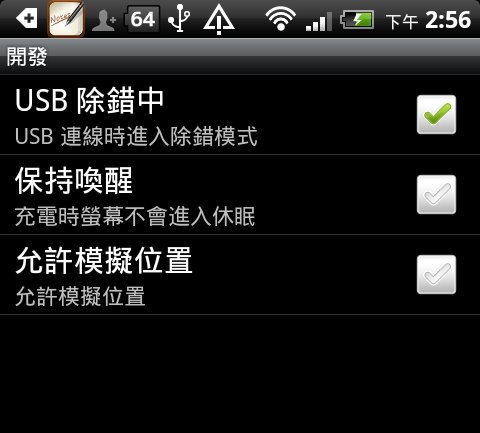
於手機桌面 MENU / 設定 / 應用程式 / 開發 / 核選「USB除錯中」,把傳輸線接上 (需裝同步程式)。
在檔案總管 Android SDK 資料夾下目錄中上按滑鼠左鍵兩下執行,會開啟 Dalvik Debug Monitor 畫面。點選要截取畫面的手機。
執行 Device / Screen capture。
按 Save 鈕可將畫面存檔。 (按 Refresh 鈕可更新畫面)
於手機桌面 MENU / 設定 / 應用程式 / 開發 / 核選「USB除錯中」,把傳輸線接上 (需裝同步程式)。
在檔案總管 Android SDK 資料夾下目錄中上按滑鼠左鍵兩下執行,會開啟 Dalvik Debug Monitor 畫面。點選要截取畫面的手機。
執行 Device / Screen capture。
按 Save 鈕可將畫面存檔。 (按 Refresh 鈕可更新畫面)
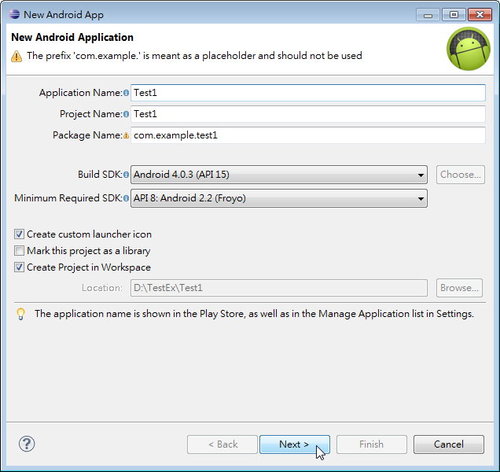
Android 系統升級到 SDK Tools R20後,操作介面有非常大的改變。對照 Android 初學特訓班第二版,修正為:
2.1.1 新增專案
開啟 Eclipse,執行功能表 File \ New \ Android Application Project,在 New Android App 對話方塊的 Application Name 欄位輸入專案名稱,名稱的第一個字母最好使用大寫字母,Project Name 及 Package Name 系統會自動建立。其餘欄位可視需求修正,否則使用預設值即可。按 Next 鈕繼續。
接下來設定應用程式的圖示,預設值為人像 (對話方塊右方的圖示),如果要更換圖示,按 Choose 鈕選擇圖示。Image 按鈕可以使用自行製作的圖示,Text 則使用文字取代圖示。按 Next 鈕繼續。
核選 Create Activity項目,同時選取 BlankActivity 建立新的空白頁面 (若取消核選 Create Activity項目,同時選取 MasterDetailFlow 表示要使用平板裝置專用的兩欄式結構)。若新頁面及配置檔都使用預設名稱,可按 Finish 鈕完成專案建立;若要變更新頁面或配置檔名稱,可按 Next 鈕繼續。為配合書中 Activity 及 Layout 名稱,按 Next 鈕繼續。
問題:
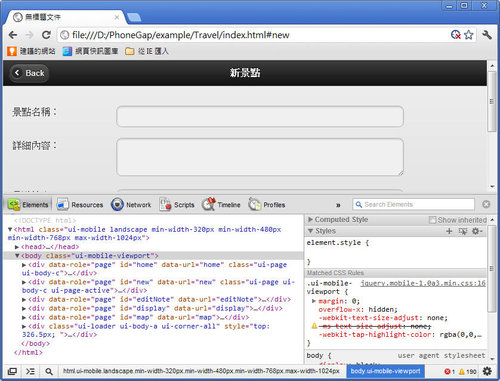
使用 PhoneGap 開發行動裝置應用程式時,Web SQL Database、Local Storage 等儲存裝置內的內容如何觀察?各種 Jquery Mobile 語法的內建 CSS 樣式如何取得?
解答:
在模擬器中以 Chrome 瀏覽器執行,按 Ctrl+Shift+I 或 F12 就可開啟 Web Inspector 面板:
切換到 Resources 頁籤就可見到 Web SQL Database、Local Storage 等儲存裝置內的內容。
問題:
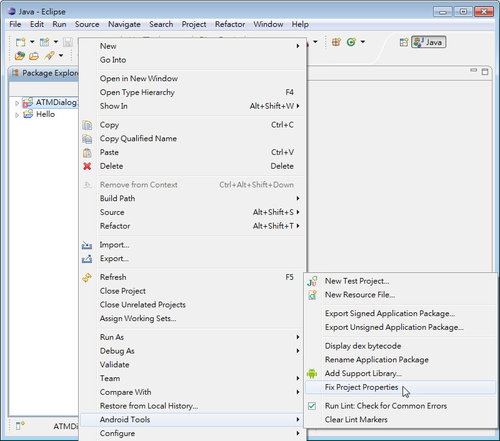
在Android 4.0.3 (API 15) 中開啟以 Ansroid 4.0 撰寫的範例,程式檔會出現許多錯誤,Console 面版顯示「Android requires compiler compliance level 5.0 or 6.0. Found '1.7' instead. Please use Android Tools > Fix Project Properties.」該如何解決?
原因:
Android compiler 的版本不正確。
解法一:
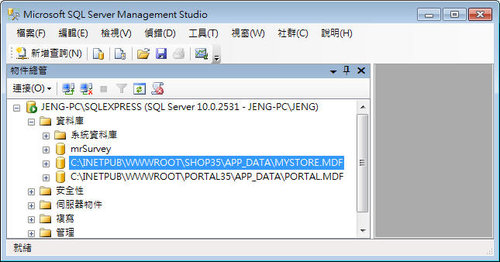
示範將 mystore.mdf 資料庫中所有資料表複製到 portal.mdf 中。
首先將 mystore.mdf 及 portal.mdf 都附加在 SQL Server management Studio 中以便處理。
在要加入資料表的資料庫 portal.mdf 上按滑鼠右鍵,點選 工作 / 匯入資料。
按 下一步 鈕。
資料來源 使用預設的 SQL Server Native Client 10.0,資料庫選擇要加入的 mystore.mdf,按 下一步 鈕。
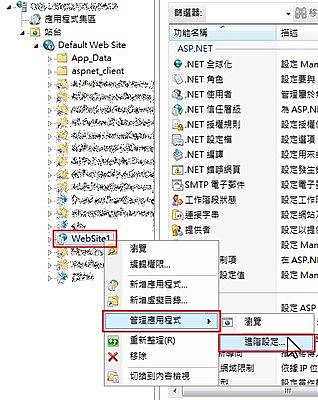
要在IIS執行ASPNET4含登入功能的網站時遭遇在 3.5許多未遇到的錯誤,整理如下:
問題1:
錯誤訊息為「剖析器錯誤訊息: 無法辨認的屬性 'targetFramework'。請注意,屬性名稱必須區分大小寫。」的處理:
解決方法:
一、找出WEB應用程式的應用程式集區名稱:
Public Shared Function ActivateWebSiteUrl(ByVal siteString As String) As String
Dim buf As String = siteString
Dim patternSite As String = "http(s)?://([\w-]+\.)+[\w-]+(/[\w\d:#@%/;$()~_?\+-=\\\.&]*)?"
Dim re As Regex = New Regex(patternSite)
If re.IsMatch(buf) Then
按著『Alt』輸入號碼,放開 Alt 時就會出現指定符號 ( ICQ 中不適用 )
(輸入數字要用鍵盤右邊數字鍵) 代碼如下:
☆ 41400
¯ 41410
﹟ 41420
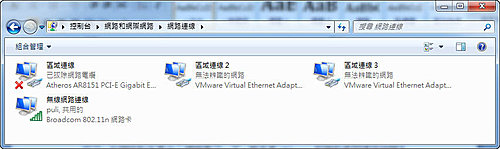
在Vista上運行VMware虛擬機使用的是NAT方式上網,到了Windows 7中就不行了。在網絡和共享中心裡面看了一下,原來是VMware創建的虛擬連接被歸為了公用網絡,無法連接到Internet。
解決方案:
首先打開Windows 7的「網絡和共享中心」,然後點左邊的「變更介面卡設定」,你會看到兩個由VMware創建的虛擬連接,找到VMnet1,記住它的連接名稱(此處為「區域連線2」)。
然後在目前使用中的連接(例如:無線網絡連線)上按滑鼠右鍵,選擇「內容 \ 共用」,把勾選全部選項,然後在家庭網絡連接中選擇VMnet1連接的名字(「區域連線2」),按「確定」鈕。
接著在「VMnet1連接」上按滑鼠右鍵,選擇「內容」,在「網際網路通訊協定第4版」上按滑鼠左鍵兩下,手動設置IP地址,預設為192.168.137.1,這樣就可以了。注意不要和你當前使用的連接在同一個網段內。
http://tw.myblog.yahoo.com/1314-5257/article?mid=75&sc=1
VMware Workstation 6.52 複製虛擬電腦教學:
http://tw.myblog.yahoo.com/1314-5257/article?mid=89&prev=261&next=75&l=f&fid=13
